Unable to authenticate session – EBS R12


Unable to authenticate session – EBS R12


EBS login error:

“Unable to Authenticate Session”


Start the Internet Explorer with the option '-noframemerging', as described in Note 389422.1 - 'Recommended Browsers for Oracle E-Business Suite Release 12' under the Known issues.

 
SOLUTION 1:

1. Clear the Browser cache.
2. Stop all Browser sessions.
3. Start a new Browser session and logon to the Instance.

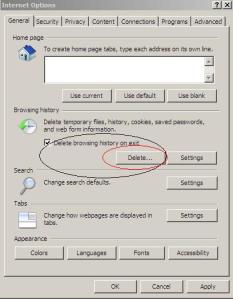
Go to Tools >Internet Options > Click on delete browsing Cache (shown below)


SOLUTION 2:


1) Start > Program Files
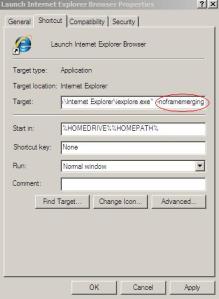
2) Right click on the Internet Explorer icon and select Properties
3) Add -nomerge to the end of the link in the Target field i.e.
“C:\Program Files\Internet Explorer\iexplore.exe” -noframemerging
4) Click the OK button to close the window


R12: Using IE8 to access two EBS Instances runs in error "Unable To Authenticate Session" [ID 1098563.1]
R12 - logon to a cloned Instance is failing with error 'Unable to Authenticate Session' [ID 744086.1]
Unable To Authenticate Session Error When Login to Different R12 Instance in Same IE Session [ID 1159313.1]
Unable To Authenticate Session When Trying To Get To Main Login Screen [ID 1353483.1]


Oracle Case sensitive password


Oracle Case sensitive password

Check value of SEC_CASE_SENSITIVE_LOGON parameter


SQL> show parameter sec_case_sensitive_logon; 

NAME TYPE VALUE
-------------------------------------------------- 
sec_case_sensitive_logon boolean TRUE

For testing purpose create a user and grant required privileges
SQL> create user test identified by TeSt; User created. SQL> grant create session to test; Grant succeeded.

Try to connect user with case sensitive password, it should work.
SQL> conn test/TeSt Connected.

Lets try to connect user with password in Lower Case
SQL> conn / as sysdba

Connected. 

SQL> conn test/test 
ERROR:
ORA-01017: invalid username/password; logon denied
Warning: You are no longer connected to ORACLE.
For re testing, configure Case Sensitivity off for user name and password 


SQL> conn / as sysdba
Connected. 

SQL> show parameter sec_case_sensitive_logon;
NAME TYPE VALUE
------------------------------------ -----------
sec_case_sensitive_logon boolean TRUE

SQL> alter system set sec_case_sensitive_logon=false scope=both;
System altered.

SQL> show parameter sec_case_sensitive_logon
NAME TYPE VALUE 
------------------------------------ -----------
 sec_case_sensitive_logon boolean FALSE
 

Try to login again with password in lower-case.
SQL> conn testuser/mypassword Connected.

ORA-00027 cannot kill current session


ORA-00027 cannot kill current session

Cause: An attempt was made to use ALTER SYSTEM KILL SESSION to kill the
current session.
Action: If it is necessary to kill the current session, do so from another session.

Identify which session to kill using following query :-
SQL> select s.sid, s.serial#, spid, trim(s.machine) machine, trim(s.module) module, status from v$session s, v$process p where paddr=addr and module is not null order by 1,2

Kill that session :-
ALTER SYSTEM KILL SESSION 'sid,serial#';

Or Kill at OS level on linux using
kill -9 spid

Notification Mailer MOS

Notification Mailer MOS

  • Troubleshooting Assistant: Oracle Workflow (1600307.2)           
  • 11i-12 Unable to Connect to Mail Store in Workflow Notification Mailer Logs (741352.1)           
  • How To Troubleshoot When Email Notification Responses Are Processed But The Approval Workflow Still Shows In Process (458665.1)           
  • Java Notification Mailer Fails to Send Email Notifications with Framework Regions (339718.1)           
  • On and Off Email Notifications (3367780)            
  • Oracle Workflow Documentation Updates for 11i.ATG_PF.H.delta.5 (RUP 5) (412709.1)           
  • 11i - 12 How To Troubleshoot Java-based Workflow Notification Mailer (242941.1)       
  • A System Administrators' Guide: Oracle Applications Workflow (139745.1)           
  • How to handle or reassign System : Error (WFERROR) Notifications that default to SYSADMIN (1448095.1)           
  • 11i - 12 How to Perform a Meaningful SMTP Telnet Test to Troubleshoot Java Mailer For Sending Email Notifications (753845.1)           
  • 11i - 12 Troubleshooting Inbound & Outbound Email Notifications (1184846.1)           
  • 11i-12 Troubleshooting Workflow Java Notification Mailer - Technical Reference (1191125.1)           
  • How to Enable notification to SYSADMIN of Invalid Email Address (750684.1)           
  • Java Notification Mailer Fails to Send Email Notifications with Framework Regions (339718.1)           
  • On and Off Email Notifications (3367780)            
  • Oracle Workflow Documentation Updates for 11i.ATG_PF.H.delta.5 (RUP 5) (412709.1)           
  • 11i - 12 How To Troubleshoot Java-based Workflow Notification Mailer (242941.1)       
  • A System Administrators' Guide: Oracle Applications Workflow (139745.1)           
  • How to handle or reassign System : Error (WFERROR) Notifications that default to SYSADMIN (1448095.1)           
  • 11i - 12 How to Perform a Meaningful SMTP Telnet Test to Troubleshoot Java Mailer For Sending Email Notifications (753845.1)           
  • 11i - 12 Troubleshooting Inbound & Outbound Email Notifications (1184846.1)           
  • 11i-12 Troubleshooting Workflow Java Notification Mailer - Technical Reference (1191125.1)           
  • How to Enable notification to SYSADMIN of Invalid Email Address (750684.1)           
  • OWF H Diagnostics, Solutions and Information (332152.1)            
  • Workflow Notification Email Preference is Disabled: How to Troubleshoot and Repair (1326359.1)
  • Java Mailer and Other 11.5.9/OWF G Current Issues in Applications 11i (260393.1)          
  • Information Center: E-Business Suite Oracle Workflow (WF) (1320509.2)
  • Getting Started With Workflow - Standalone 2.6.3/2.6.4 (266612.1)           
  • How To Redirect ERROR Notifications For Disabled Accounts Sent To SYSADMIN To Another User (973642.1)                        
  • How To Create Workflow Tag With Action Of UNDELVRD (1533879.1)           
  • Data Purging approach (3292204)
  • Error Sending Email Notifications: 554 Relay rejected for policy reasons. None of the recipients for notification is valid. Notification will not be sent. Check that the recipients email addresses are valid (1900616.1)           
  • Email Notification Failures Are Causing The Email Servers To Crash (388709.1)           
  • Email Notifications are not Sent to Users after Configuring the Workflow Mailer (743282.1)           
  • How To Correct Workflow Email Notifications Showing Junk Characters In A Multi Language Environment (1663060.1)           
  • Can the Workflow Mailer Send an Email To the Sysadmin if the Email Notification is Undeliverable? (1066105.1)           
  • Not Receiving Email Notification for Expense Reports Submitted Through iExpenses (1079644.1)
  • Guidance to Encrypt Content of the Email Notifications for Workflow Mailer (742643.1)           
  • How To Notify SYSADMIN If A Notificaiton Has Failed To Deliver (456378.1)           
  • Java Notification Mailer configuration fails on EMail Servers configuration page (1239213.1)    

Error : The configuration program is to be executed in a virtual machine


Error : The configuration program is to be executed in a virtual machine

1. Edit the file vmware-config-tools.pl with text editor.
2. Search for the string "sub configure_tools {".
3. Comment the first 5 lines of this sub.
4. Save the changes.

Try again executing vmware-config-tools.pl.