R12: Error "Java Exception in Thread 'Main' java.lang.OutOfMemoryError: Java Heap Space

R12: Error "Java Exception in Thread 'Main' java.lang.OutOfMemoryError: Java Heap Space

Increase the amount of memory available as follows:

a. Login to the instance as system administrator
b. Go to Concurrent -> Program -> Define
c. Search for the following concurrent program
d. In the 'Executable' group, there is a field named 'Options'.
Enter the value '-ms2048m -mx2048m' as the value for this field.
This will set the heap space min and max size to 2GB.
Bounce the concurrent managers.

e. Save the change and retest the issue.

Delete large number of files - LINUX

Delete large number of files - LINUX

Go to the folder location

cd < folder name>

A faster way of deleting files is the -delete flag:
find . -type f -delete
To show the filenames while deleting them:
find . -type f -print -delete
To show how many files will be deleted, then time how long it takes to delete them:
ls -1 | wc -l && time find . -type f -delete
 The above commands will remove all the files in the folder, then you can use rm -rf to remove the folder.

Unable to authenticate session – EBS R12


Unable to authenticate session – EBS R12


EBS login error:

“Unable to Authenticate Session”


Start the Internet Explorer with the option '-noframemerging', as described in Note 389422.1 - 'Recommended Browsers for Oracle E-Business Suite Release 12' under the Known issues.

 
SOLUTION 1:

1. Clear the Browser cache.
2. Stop all Browser sessions.
3. Start a new Browser session and logon to the Instance.

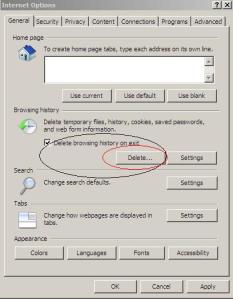
Go to Tools >Internet Options > Click on delete browsing Cache (shown below)


SOLUTION 2:


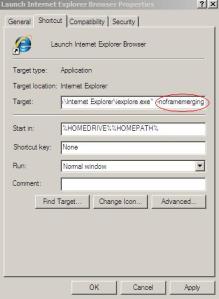
1) Start > Program Files
2) Right click on the Internet Explorer icon and select Properties
3) Add -nomerge to the end of the link in the Target field i.e.
“C:\Program Files\Internet Explorer\iexplore.exe” -noframemerging
4) Click the OK button to close the window


R12: Using IE8 to access two EBS Instances runs in error "Unable To Authenticate Session" [ID 1098563.1]
R12 - logon to a cloned Instance is failing with error 'Unable to Authenticate Session' [ID 744086.1]
Unable To Authenticate Session Error When Login to Different R12 Instance in Same IE Session [ID 1159313.1]
Unable To Authenticate Session When Trying To Get To Main Login Screen [ID 1353483.1]


Oracle Case sensitive password


Oracle Case sensitive password

Check value of SEC_CASE_SENSITIVE_LOGON parameter


SQL> show parameter sec_case_sensitive_logon; 

NAME TYPE VALUE
-------------------------------------------------- 
sec_case_sensitive_logon boolean TRUE

For testing purpose create a user and grant required privileges
SQL> create user test identified by TeSt; User created. SQL> grant create session to test; Grant succeeded.

Try to connect user with case sensitive password, it should work.
SQL> conn test/TeSt Connected.

Lets try to connect user with password in Lower Case
SQL> conn / as sysdba

Connected. 

SQL> conn test/test 
ERROR:
ORA-01017: invalid username/password; logon denied
Warning: You are no longer connected to ORACLE.
For re testing, configure Case Sensitivity off for user name and password 


SQL> conn / as sysdba
Connected. 

SQL> show parameter sec_case_sensitive_logon;
NAME TYPE VALUE
------------------------------------ -----------
sec_case_sensitive_logon boolean TRUE

SQL> alter system set sec_case_sensitive_logon=false scope=both;
System altered.

SQL> show parameter sec_case_sensitive_logon
NAME TYPE VALUE 
------------------------------------ -----------
 sec_case_sensitive_logon boolean FALSE
 

Try to login again with password in lower-case.
SQL> conn testuser/mypassword Connected.

ORA-00027 cannot kill current session


ORA-00027 cannot kill current session

Cause: An attempt was made to use ALTER SYSTEM KILL SESSION to kill the
current session.
Action: If it is necessary to kill the current session, do so from another session.

Identify which session to kill using following query :-
SQL> select s.sid, s.serial#, spid, trim(s.machine) machine, trim(s.module) module, status from v$session s, v$process p where paddr=addr and module is not null order by 1,2

Kill that session :-
ALTER SYSTEM KILL SESSION 'sid,serial#';

Or Kill at OS level on linux using
kill -9 spid